There are many reasons to learn an ORM tool like JPA. I will not go into the details of this because there are already many posts on the web which perfectly answer this question, like this one, or this one. However, we should also keep in mind that this is not a single magic bullet which will solve our every problem.
When I first started out with JPA, I had real difficulties to set it up because most of the articles on the web are written for Java EE environment only, whereas I was trying to use it in a Java SE environment. I hope that this article will be helpful for those who wish to do the same in the future.
In this example we will use Maven to set up our required dependencies. Since JPA is only a specification, we will also need an implementation. There are many good implementations of JPA available freely (like EclipseLink, Hibernate etc.). For this article I have chosen to use Hibernate. As for the database, I will use MySQL.
Let us first create a simple maven project. I have created mine using the quick start archetype from the command line. If you do not know how to do that, you can follow this tutorial.
OK, so let us get the dependencies for the JPA next. Include the following lines in your pom.xml -
01.<dependency>02.<groupId>javax.persistence</groupId>03.<artifactId>persistence-api</artifactId>04.<version>1.0.2</version>05.</dependency>06.<dependency>07.<groupId>org.hibernate</groupId>08.<artifactId>hibernate-entitymanager</artifactId>09.<version>4.3.6.Final</version>10.<exclusions>11.<exclusion>12.<groupId>org.hibernate.javax.persistence</groupId>13.<artifactId>hibernate-jpa-2.1-api</artifactId>14.</exclusion>15.</exclusions>16.</dependency>1.<dependency>2.<groupId>org.hibernate</groupId>3.<artifactId>hibernate-entitymanager</artifactId>4.<version>4.3.6.Final</version>5.</dependency>1.<dependency>2.<groupId>mysql</groupId>3.<artifactId>mysql-connector-java</artifactId>4.<version>5.1.31</version>5.</dependency>01.<project xmlns="http://maven.apache.org/POM/4.0.0" xmlns:xsi="http://www.w3.org/2001/XMLSchema-instance"02.xsi:schemaLocation="http://maven.apache.org/POM/4.0.0 <a href="http://maven.apache.org/xsd/maven-4.0.0.xsd">http://maven.apache.org/xsd/maven-4.0.0.xsd"</a>>03. 04.<modelVersion>4.0.0</modelVersion>05. 06.<groupId>com.keertimaan.javasamples</groupId>07.<artifactId>jpa-example</artifactId>08.<version>0.0.1-SNAPSHOT</version>09.<packaging>jar</packaging>10. 11.<name>jpa-example</name>12.<url>http://sayemdb.wordpress.com<;/url>13. 14.<properties>15.<java.version>1.8</java.version>16.<hibernate.version>4.3.6.Final</hibernate.version>17.<project.build.sourceEncoding>UTF-8</project.build.sourceEncoding>18.</properties>19. 20.<dependencies>21.<!-- JPA -->22.<dependency>23.<groupId>org.hibernate</groupId>24.<artifactId>hibernate-entitymanager</artifactId>25.<version>${hibernate.version}</version>26.</dependency>27. 28.<!-- For connection pooling -->29.<dependency>30.<groupId>org.hibernate</groupId>31.<artifactId>hibernate-c3p0</artifactId>32.<version>${hibernate.version}</version>33.</dependency>34. 35.<!-- Database -->36.<dependency>37.<groupId>mysql</groupId>38.<artifactId>mysql-connector-java</artifactId>39.<version>5.1.31</version>40.</dependency>41. 42.<!-- Test -->43.<dependency>44.<groupId>junit</groupId>45.<artifactId>junit</artifactId>46.<version>4.11</version>47.<scope>test</scope>48.<exclusions>49.<exclusion>50.<groupId>org.hamcrest</groupId>51.<artifactId>hamcrest-core</artifactId>52.</exclusion>53.</exclusions>54.</dependency>55.<dependency>56.<groupId>org.hamcrest</groupId>57.<artifactId>hamcrest-all</artifactId>58.<version>1.3</version>59.<scope>test</scope>60.</dependency>61.</dependencies>62. 63.<build>64.<plugins>65.<plugin>66.<groupId>org.apache.maven.plugins</groupId>67.<artifactId>maven-compiler-plugin</artifactId>68.<version>2.5.1</version>69.<configuration>70.<source>${java.version}</source>71.<target>${java.version}</target>72.<compilerArgument>-Xlint:all</compilerArgument>73.<showWarnings>true</showWarnings>74.<showDeprecation>true</showDeprecation>75.</configuration>76.</plugin>77.</plugins>78.</build>79.</project>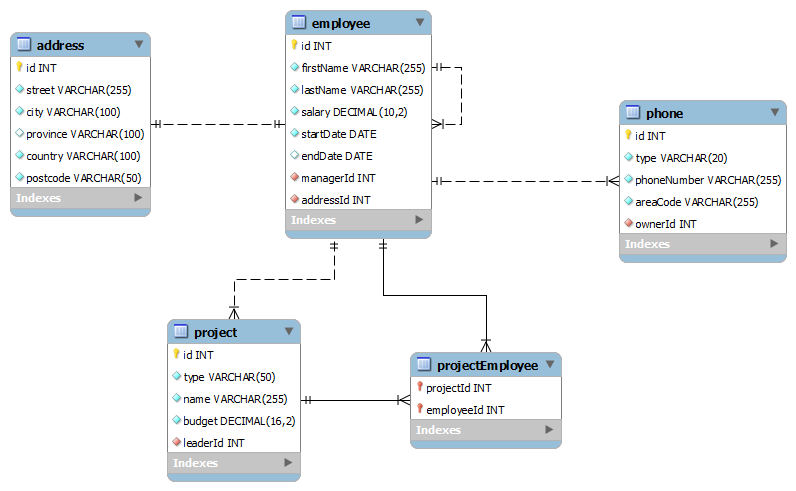
Database Schema
Create an equivalent database following the above schema in your local MySQL installation.Our next step is to create the persistence.xml file which will contain our database specific information for JPA to use. By default JPA expects this file to be in the class path under the META-INF folder. For our maven project, I have created this file under project_root/src/main/resources/META-INF folder -
01.<persistence xmlns="http://xmlns.jcp.org/xml/ns/persistence" xmlns:xsi="http://www.w3.org/2001/XMLSchema-instance"02.xsi:schemaLocation="http://xmlns.jcp.org/xml/ns/persistence03. 04.<a href="http://xmlns.jcp.org/xml/ns/persistence/persistence_2_1.xsd">http://xmlns.jcp.org/xml/ns/persistence/persistence_2_1.xsd"</a>05. 06.version="2.1">07. 08.<persistence-unit name="jpa-example" transaction-type="RESOURCE_LOCAL">09.<provider>org.hibernate.jpa.HibernatePersistenceProvider</provider>10. 11.<properties>12.<property name="javax.persistence.jdbc.url" value="jdbc:mysql://localhost/jpa_example" />13.<property name="javax.persistence.jdbc.user" value="root" />14.<property name="javax.persistence.jdbc.password" value="my_root_password" />15.<property name="javax.persistence.jdbc.driver" value="com.mysql.jdbc.Driver" />16. 17.<property name="hibernate.show_sql" value="true" />18.<property name="hibernate.format_sql" value="true" />19.<property name="hibernate.dialect" value="org.hibernate.dialect.MySQL5InnoDBDialect" />20.<property name="hibernate.hbm2ddl.auto" value="validate" />21. 22.<!-- Configuring Connection Pool -->23.<property name="hibernate.c3p0.min_size" value="5" />24.<property name="hibernate.c3p0.max_size" value="20" />25.<property name="hibernate.c3p0.timeout" value="500" />26.<property name="hibernate.c3p0.max_statements" value="50" />27.<property name="hibernate.c3p0.idle_test_period" value="2000" />28.</properties>29.</persistence-unit>30.</persistence>Ok, let us now create an entity to test our configuration. Create a class called Address with the following contents -
001.import javax.persistence.Entity;002.import javax.persistence.GeneratedValue;003.import javax.persistence.Id;004.import javax.persistence.Table;005. 006.@Entity007.@Table(name = "address")008.public class Address {009.@Id010.@GeneratedValue011.private Integer id;012. 013.private String street;014.private String city;015.private String province;016.private String country;017.private String postcode;018. 019./**020.* @return the id021.*/022.public Integer getId() {023.return id;024.}025. 026./**027.* @param id the id to set028.*/029.public Address setId(Integer id) {030.this.id = id;031.return this;032.}033. 034./**035.* @return the street036.*/037.public String getStreet() {038.return street;039.}040. 041./**042.* @param street the street to set043.*/044.public Address setStreet(String street) {045.this.street = street;046.return this;047.}048. 049./**050.* @return the city051.*/052.public String getCity() {053.return city;054.}055. 056./**057.* @param city the city to set058.*/059.public Address setCity(String city) {060.this.city = city;061.return this;062.}063. 064./**065.* @return the province066.*/067.public String getProvince() {068.return province;069.}070. 071./**072.* @param province the province to set073.*/074.public Address setProvince(String province) {075.this.province = province;076.return this;077.}078. 079./**080.* @return the country081.*/082.public String getCountry() {083.return country;084.}085. 086./**087.* @param country the country to set088.*/089.public Address setCountry(String country) {090.this.country = country;091.return this;092.}093. 094./**095.* @return the postcode096.*/097.public String getPostcode() {098.return postcode;099.}100. 101./**102.* @param postcode the postcode to set103.*/104.public Address setPostcode(String postcode) {105.this.postcode = postcode;106.return this;107.}108.}01.import javax.persistence.EntityManager;02.import javax.persistence.EntityManagerFactory;03.import javax.persistence.Persistence;04. 05.public enum PersistenceManager {06.INSTANCE;07. 08.private EntityManagerFactory emFactory;09. 10.private PersistenceManager() {11.// "jpa-example" was the value of the name attribute of the12.// persistence-unit element.13.emFactory = Persistence.createEntityManagerFactory("jpa-example");14.}15. 16.public EntityManager getEntityManager() {17.return emFactory.createEntityManager();18.}19. 20.public void close() {21.emFactory.close();22.}23.}01.import javax.persistence.EntityManager;02. 03.public class Main {04.public static void main(String[] args) {05.Address address = new Address();06.address.setCity("Dhaka")07..setCountry("Bangladesh")08..setPostcode("1000")09..setStreet("Poribagh");10. 11.EntityManager em = PersistenceManager.INSTANCE.getEntityManager();12.em.getTransaction()13..begin();14.em.persist(address);15.em.getTransaction()16..commit();17. 18.em.close();19.PersistenceManager.INSTANCE.close();20.}21.}This article explains how to set up JPA without using any other frameworks like Spring. However it is a very good idea to use Spring to set up JPA because in that case we do not need to worry about managing entity managers, transactions etc. Beside setting up JPA, spring is also very good for many other purposes too.
